How to Build a Yelp Scraper with PixieBrix
Yelp is one of the most trusted sources of local business intelligence on the internet. Star ratings, written reviews, business hours, phone numbers, menu items, price ranges, categories, and neighborhood data - it's all publicly visible across millions of business listings, updated continuously by a community of real customers. For local businesses, marketers, sales teams, and researchers, knowing how to scrape Yelp data is one of the highest-leverage moves available.
The problem? There's no export button. If you need to scrape Yelp reviews for sentiment analysis, pull Yelp business data into a prospecting sheet, monitor your own listing's review trajectory, or scrape Yelp search results for a local market analysis, your options have historically been limited and frustrating. You either copy data by hand - one business or one review at a time - or you invest in a technical setup that most people don't have.
Traditional approaches to web scrape Yelp come with real friction. Scraping Yelp with Python using BeautifulSoup or Scrapy works until Yelp updates its markup or tightens its bot detection - then it breaks and requires developer time to fix. The Yelp Fusion API provides structured access to some data, but it's rate-limited, incomplete on review content, and requires API key management that most non-technical users can't navigate. If you've searched "scrape Yelp Python" or "BeautifulSoup scrape Yelp data" hoping for a clean solution, you know the path to working data is longer than it looks.
That's where PixieBrix's AI Page Editor changes everything. It's a browser-native, point-and-click interface that lets you scrape Yelp data - reviews, business details, menus, and search results - by describing what you want in plain English. No terminal. No selectors. No API credentials. Just: "grab the business name, rating, review count, price range, and address from this Yelp listing" - and the AI builds the extractor for you, live in your browser.
In this post, we'll walk through everything: what PixieBrix is, who needs to scrape Yelp data and why, and a complete step-by-step guide to building your own no-code Yelp scraper using the AI Page Editor - in about fifteen minutes.
Who Needs to Scrape Yelp? (And Why)
Scraping Yelp data is useful across a wide range of roles and use cases. Here's who benefits most - and why manual research simply doesn't scale.
Local businesses monitoring their reputation. If your business has a hundred Yelp reviews, reading them one by one is painful and logging patterns manually is even worse. Scraping Yelp reviews into a spreadsheet lets you analyze sentiment trends, track how your average rating shifts over time, identify recurring complaints, and spot the specific experiences that drive five-star versus one-star reviews. That kind of structured analysis drives real decisions about operations, staffing, and customer experience - but only if you can get the data out of Yelp and into a tool where you can actually work with it.
Sales teams building local business prospect lists. Yelp is one of the richest databases of local business contact information available anywhere. Scraping Yelp search results for a specific business category and geography - extracting business name, phone number, website, rating, and review count - gives sales teams a qualified, structured prospect list without a paid lead generation subscription. For agencies, consultants, and B2B sales reps targeting local businesses, this is one of the most direct paths from "target market" to "ready-to-dial list."
Marketers and reputation management agencies. Agencies managing local SEO and online reputation for clients need to monitor Yelp review data at scale - across multiple client listings, multiple categories, and multiple markets. Manually checking each listing is unsustainable. A scraper that captures review data on demand and pushes it to a client reporting sheet turns a daily manual task into a one-click workflow.
Restaurant and hospitality operators. Yelp is particularly data-rich for restaurants - menu items, price ranges, cuisine categories, hours, reservation availability, and review sentiment all live on Yelp business pages. Operators and consultants who scrape Yelp menu data and review content for a set of competitors can build a structured competitive intelligence picture that would take hours to assemble manually.
Market researchers and data analysts. Researchers studying local market dynamics, consumer sentiment, business density, or category competition use Yelp as a primary data source. Being able to scrape Yelp search results, Yelp SERP data, and Yelp review content into structured datasets is foundational to that kind of work - and the manual alternative doesn't scale beyond a handful of data points.
Developers prototyping Yelp data pipelines. For technical users who've been looking at how to scrape Yelp using Python or how to use a Yelp web scraper for a data project, PixieBrix offers a faster path to a verified data structure. Build the extraction in the Page Editor, confirm the output fields are correct, then use a webhook brick to route data into your downstream pipeline - no BeautifulSoup environment to configure, no rate limit wrangling.
What Is PixieBrix Page Editor?
PixieBrix is a low-code browser extension platform that lets you customize, automate, and extend any website - including ones you didn't build and don't control. Think of it as a toolkit for bending the web to fit your workflow, without writing a line of code.
At the core of PixieBrix is the Page Editor: a point-and-click interface that lives in your browser's developer panel. With it, you can create custom browser "mods" - lightweight extensions that extract data from a page, inject new UI elements, trigger automations, or push data to external tools like Google Sheets, Airtable, or a CRM.
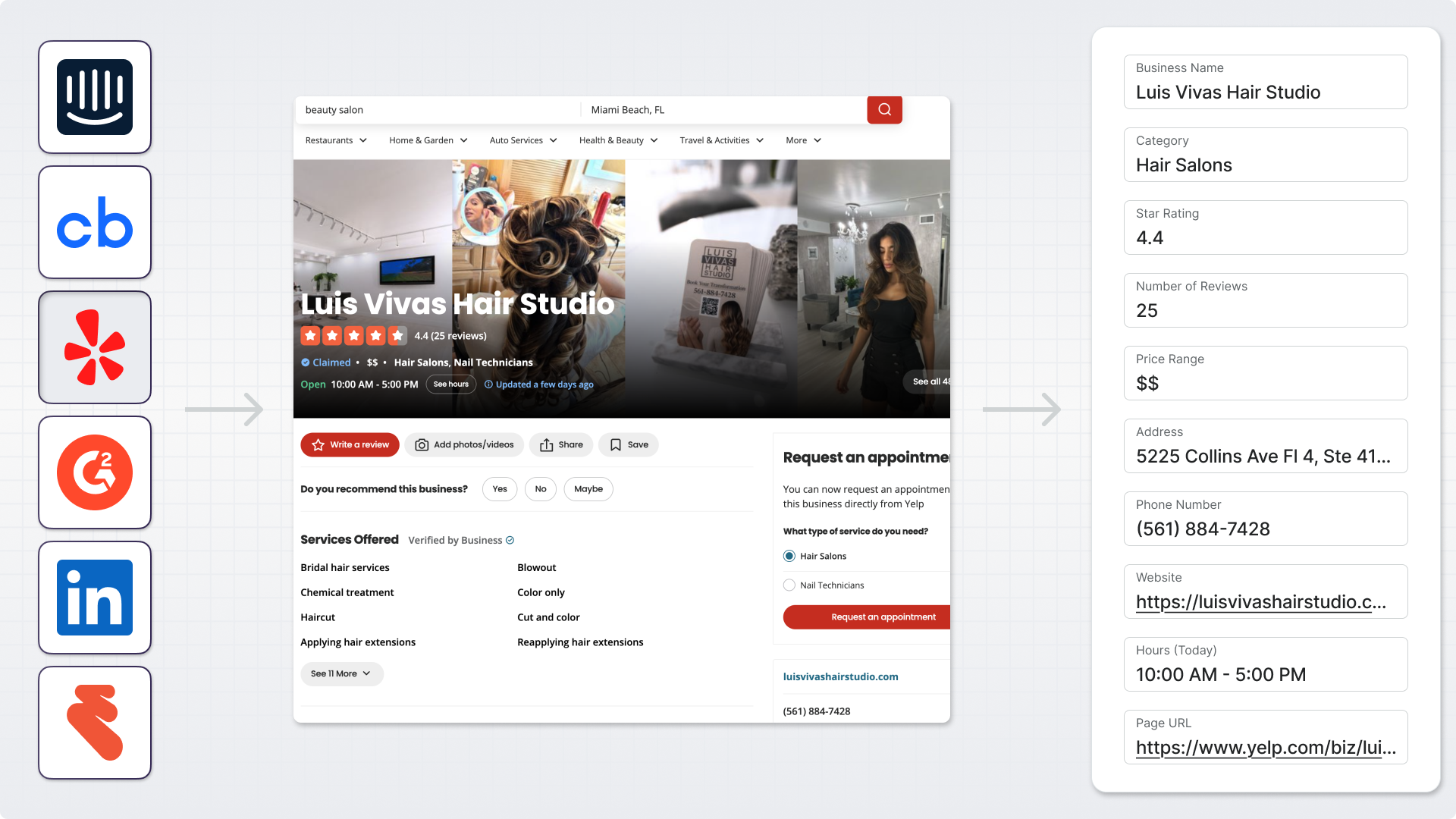
The building blocks of every mod are called bricks - pre-made components for extracting HTML, transforming data, calling APIs, and writing output wherever you need it. You configure them visually, and the result runs inside your browser tab in real time.
The AI layer is what makes the whole thing feel instant. Instead of hunting for the right CSS selector or reverse-engineering Yelp's DOM structure, you describe the data you want in natural language. The AI reads the page, identifies the matching elements, and wires up the extraction logic automatically. If it gets something wrong, you correct it in plain English. You're directing, not coding.
What Is Vibe Coding? (And Why It's the Fastest Way to Scrape Yelp)
"Vibe coding" describes a new approach to building software: instead of writing code from scratch, you describe your intent in natural language and let AI handle the implementation. You articulate what you want - the AI figures out how to build it.
For anyone who's tried to scrape Yelp reviews with Python, used BeautifulSoup to scrape Yelp data, or attempted to work around the Yelp Fusion API's limitations, the appeal is immediate. The hardest part of building a Yelp scraper has never been knowing what data you want - it's always been the implementation: navigating Yelp's dynamic page rendering, managing pagination across review pages, handling anti-bot detection, and maintaining scripts when Yelp pushes a frontend update. Vibe coding eliminates that entire maintenance burden.
With PixieBrix's AI Page Editor, you don't need to know how Yelp structures its review markup, how to scrape Yelp API data programmatically, or how to handle Yelp's JavaScript-rendered content. You just describe what you want - and the AI builds the extractor. No Yelp API key required. No scrape Yelp Python environment to configure. No deployment pipeline to maintain.
For the local business owners, marketers, sales teams, and researchers who need to scrape data from Yelp regularly but don't have developer resources, vibe coding is the unlock that makes it actually feasible.
Step-by-Step: Building a Yelp Business Scraper with PixieBrix
Here's the full build - from a blank PixieBrix setup to a working Yelp scraper that copies structured data to your clipboard on demand.
Step 1: Install PixieBrix
Install the PixieBrix browser extension. PixieBrix runs directly inside your browser and can interact with the SaaS tools your team already uses.

Once installed, navigate to any Yelp business listing. Open the PixieBrix Page Editor through the toolbar icon or via Chrome DevTools. The editor opens alongside your active tab, giving you a live view of the page you're about to scrape.
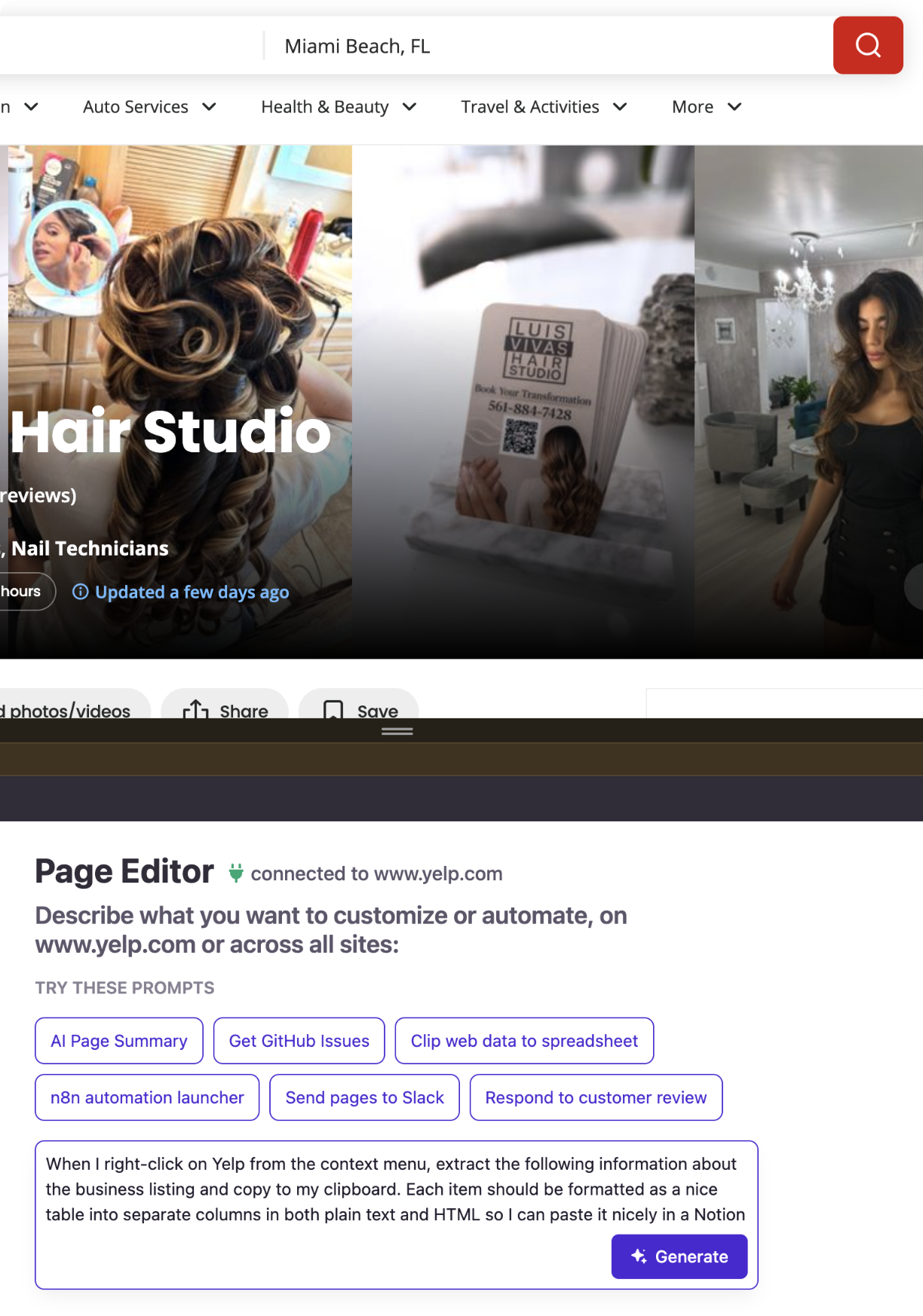
Step 2: Describe Your Yelp Scraper in Plain English
This is the step that makes PixieBrix different from every other way to scrape Yelp. You don't configure bricks, write CSS selectors, or navigate Yelp's API documentation. You just describe what you want in the Page Editor's AI prompt field. Here's the exact prompt used to build the Yelp business scraper in this post:
"When I right-click on Yelp from the context menu, extract the following information about the business listing and copy to my clipboard. Each item should be formatted as a nice table into separate columns in both plain text and HTML so I can paste it nicely in a Notion table or Google Sheet row. Do not include a header.
- Business Name
- Category
- Star Rating
- Number of Reviews
- Price Range
- Address
- Phone Number
- Website
- Hours (Today)
- Page URL"
You're describing the trigger (right-click context menu), the exact fields you want extracted (ten data points from the business page), the output format (a plain text and HTML table for clean pasting), and the destination (clipboard). No selectors. No API credentials. No schema configuration.
Step 3: Let PixieBrix Build the Mod
After submitting your prompt, PixieBrix's AI analyzes the current Yelp page structure and generates the complete mod - trigger, extraction logic, data formatting, and clipboard output - all wired together automatically. No configuration required on your end.
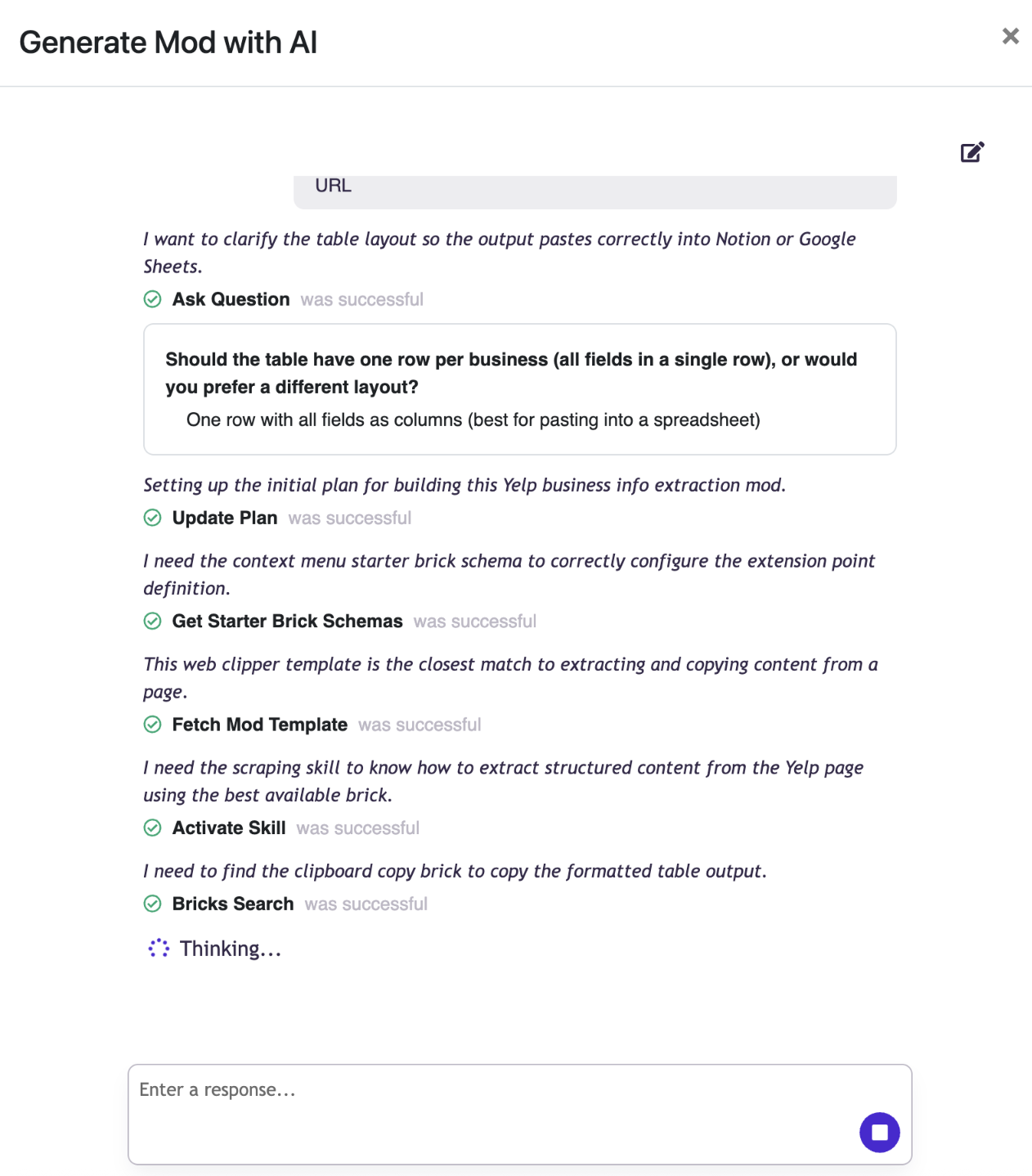
Step 4: See What Was Built (and Hit Test)
Once the AI finishes, the Page Editor shows you exactly what was constructed. You'll see a clean three-brick pipeline:
- Context Menu - the trigger. PixieBrix has registered a new right-click option that fires the mod whenever you're on a Yelp business listing page.
- Extract from Page using AI - the intelligence layer. This brick reads the current page's DOM and extracts all ten fields you specified. The output is stored as
@business. - Copy to clipboard - the output. The extracted data lands on your clipboard as a formatted plain text and HTML table with no header row, ready to paste directly into Google Sheets or Notion.
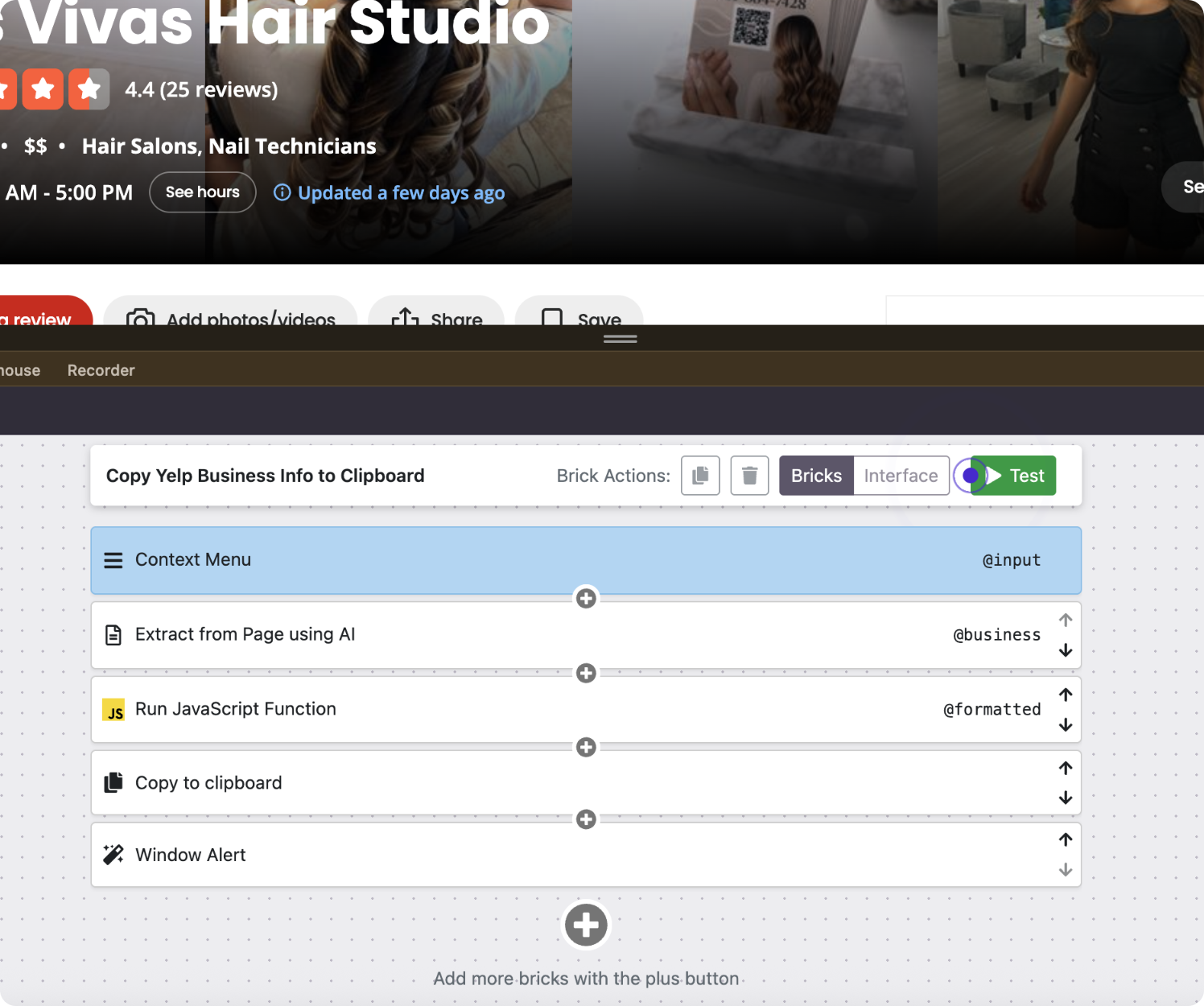
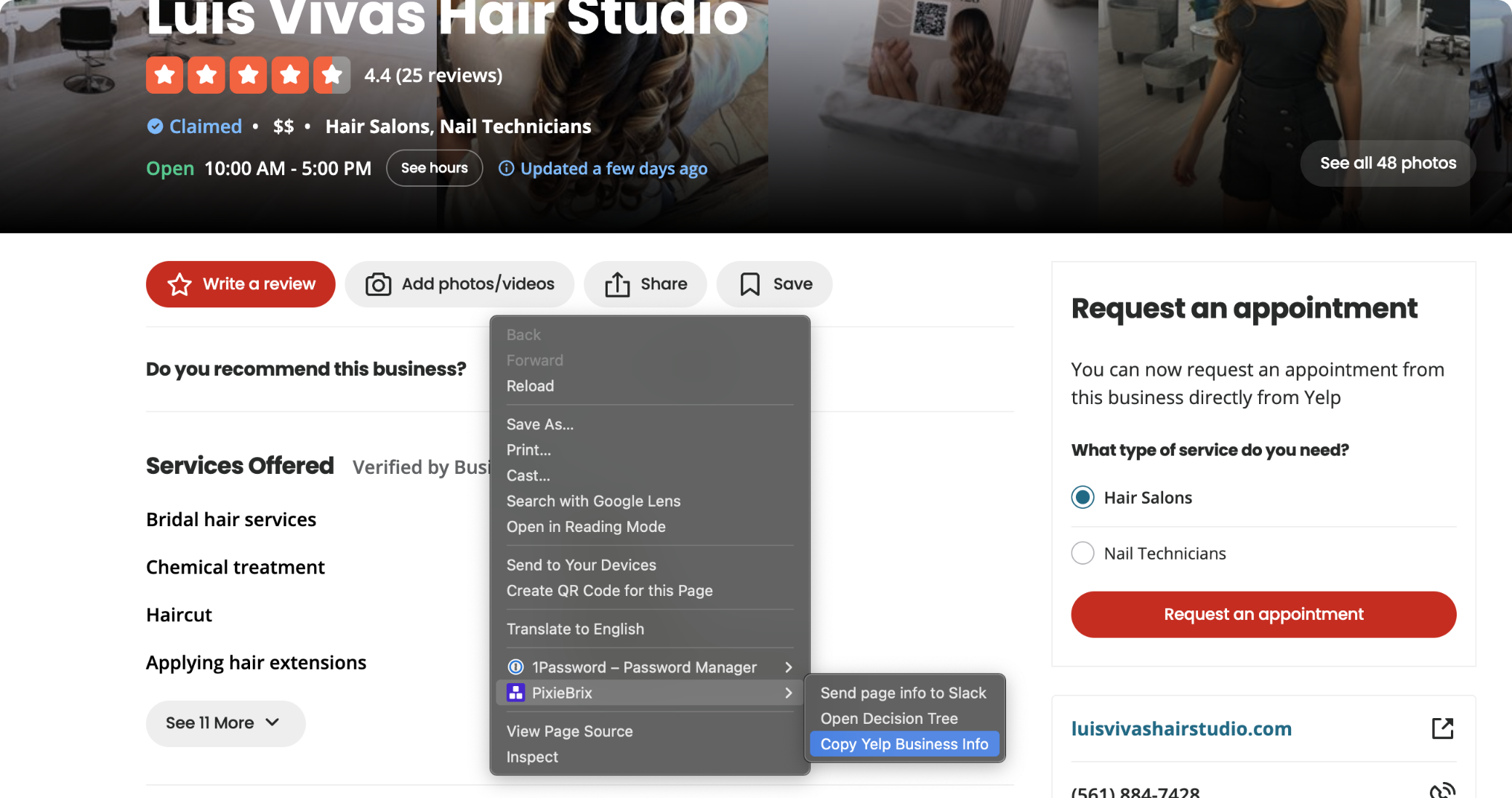
Hit the green "Test" button to run a live extraction against the Yelp page currently open in your tab. A popup will appear directly on the Yelp page confirming the data is ready.
From here, navigate to any Yelp business listing and right-click anywhere on the page. Select "Copy Yelp Business to Clipboard" from the context menu - PixieBrix extracts all ten fields in real time and surfaces a small popup with a single "Copy text" button. Click it, and the formatted table is on your clipboard.
Step 5: Paste Into Google Sheets or Notion
Because PixieBrix copies data in both plain text and HTML table format simultaneously, pasting is clean in any tool - no reformatting, no column alignment work.
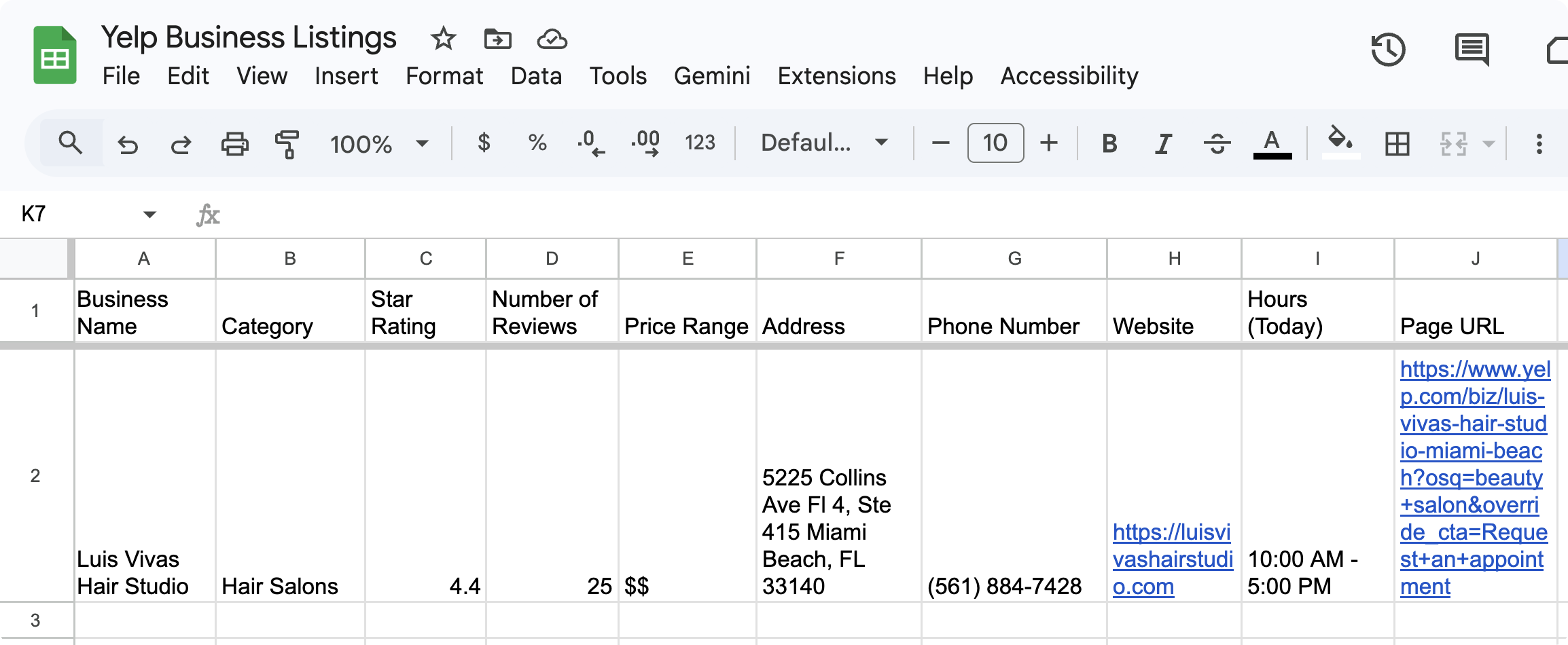
In Google Sheets: Click into the first empty cell in your target row and hit Cmd+V (Mac) or Ctrl+V (Windows). All ten fields - Business Name, Category, Star Rating, Number of Reviews, Price Range, Address, Phone Number, Website, Hours (Today), and Page URL - paste across individual columns automatically. Keep a running Google Sheet open in a pinned tab and paste after every business listing you research. Building a hundred-row prospect or competitor database takes minutes, not hours.
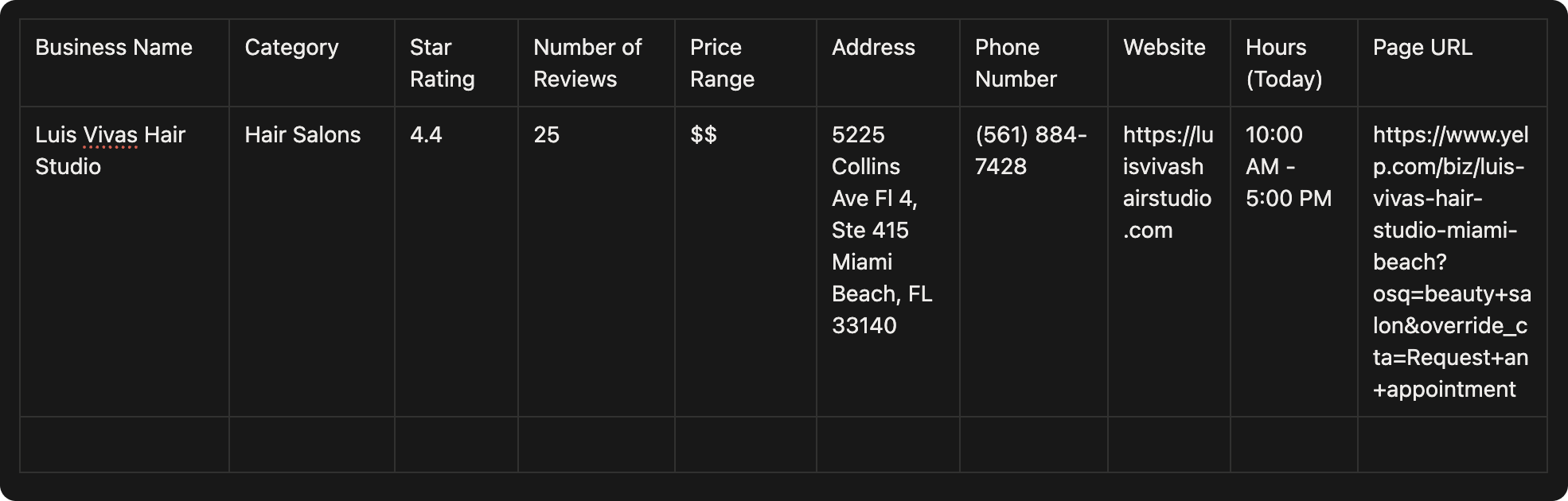
In Notion: Click into any table row and paste. Notion reads the HTML table format and distributes each field into its own column cleanly. Match your Notion database column names to the fields in your prompt and every paste will slot in perfectly.
That's the complete workflow: right-click a Yelp business page → click "Copy text" → paste into your database. Ten fields, one right-click, zero manual typing.
Google Sheets and Notion are just the starting point. PixieBrix integrates with a wide range of tools via direct connections and webhooks - so you can push scraped Yelp data straight into Airtable, Salesforce, HubSpot, Slack, Microsoft Excel, Coda, Monday.com, Jira, or any platform with a REST API endpoint. That means the same Yelp scraper mod can feed a live CRM pipeline, trigger a Slack alert for your sales team when a new prospect is logged, append rows to an Airtable market research tracker, or kick off a Zapier or Make workflow - all without leaving your browser or writing a single line of code.
Try It Yourself
Open PixieBrix's Page Editor on any Yelp business listing, paste the prompt below, and your Yelp business scraper will be built in seconds:
"When I right-click on Yelp from the context menu, extract the following information about the business listing and copy to my clipboard. Each item should be formatted as a nice table into separate columns in both plain text and HTML so I can paste it nicely in a Notion table or Google Sheet row. Do not include a header.
- Business Name
- Category
- Star Rating
- Number of Reviews
- Price Range
- Address
- Phone Number
- Website
- Hours (Today)
- Page URL"
One prompt. One mod. One right-click to scrape Yelp data into your workflow.
Try Yelp Listing Scraper
More Yelp Scraping Use Cases to Build Next
The business listing scraper is just the beginning. Here are the highest-value extensions to build next - each targeting a different slice of Yelp's data.
How to Scrape Yelp Reviews. Yelp reviews are among the most detailed and trusted consumer-generated content on the internet - and scraping Yelp reviews is one of the most searched data extraction use cases for local business intelligence. Build a mod that extracts the five most recent reviews from any Yelp business page in a single pass - reviewer name, star rating, review date, review text, and "Useful/Funny/Cool" counts. Whether you're doing brand monitoring, sentiment analysis, or competitive research, being able to scrape reviews from Yelp on demand - without a Yelp data scraper subscription or Python environment - is a significant workflow unlock. The same approach works for scraping Yelp reviews in Python via a webhook output if you need to pipe the data into a larger pipeline.
Scrape Yelp Search Results. Yelp search result pages and Yelp SERP pages list every business matching a category and location query - business name, star rating, review count, price range, neighborhood, and a snippet of the most recent review. Build a mod that scrapes Yelp search data from a results page in one pass, turning any Yelp search into an instant structured dataset without clicking into individual listings. This is especially powerful for sales teams building hyper-local prospect lists: search "marketing agency San Francisco" on Yelp, trigger the mod, and extract every visible result into a Google Sheet in seconds. The same approach works to scrape Yelp search engine results and Yelp SERP data across any category and geography combination.
Scrape Yelp Menu Data. For restaurants, bars, cafes, and food businesses, Yelp menu pages are a rich competitive intelligence source - dish names, descriptions, and prices are often listed in full. Build a mod that scrapes Yelp menu data from any restaurant listing page, extracting menu sections, item names, and prices into a structured table. Useful for restaurant operators benchmarking competitor menus, food delivery aggregators building menu databases, or consultants analyzing pricing strategy across a local market.
Scrape Yelp Business Data at Category Scale. Rather than scraping individual listings, build a page-load triggered mod that extracts all visible business cards from a Yelp category page - name, rating, review count, price range, and neighborhood - every time you land on a Yelp search results page. Combine this with manual pagination through search result pages and you can build a comprehensive local business database for any category and geography in a single research session.
Yelp Competitor Review Tracker. Build a mod that extracts the most recent reviews from a competitor's Yelp page on a scheduled or triggered basis and pushes them to a Slack channel or Google Sheet. Your team gets a running feed of what customers are saying about competitors - pricing complaints, service gaps, standout experiences - without anyone having to remember to check Yelp manually. Feed that data into a Make or Zapier workflow to trigger automated reporting or CRM updates.
Each of these follows the same build pattern as the business scraper - a natural language prompt, a three-brick pipeline, and a clipboard or webhook output. Once you've built one, the next one takes a fraction of the time.
Can You Scrape Yelp? What You Need to Know
One of the most common questions in this space is simply: can you scrape Yelp? Here's the honest answer - and what it means for how you use PixieBrix.
The Yelp Fusion API as an alternative for high volume. If you need to scrape Yelp API data at high volume - hundreds of businesses per minute, scheduled batch jobs, real-time feeds - the Yelp Fusion API is the appropriate tool. It's rate-limited and incomplete on full review text, but it's the legitimate path for programmatic access at scale. PixieBrix is optimized for the human-paced workflow; the API is better for production pipelines.
Review content truncation. Yelp truncates long reviews behind a "Read more" link. If you need the full text of longer reviews, expand them manually before triggering the mod, or add an instruction to your prompt asking PixieBrix to capture the full expanded review text.
Your data stays local. All data PixieBrix extracts stays in your browser and goes only where you direct it - your clipboard, your Google Sheet, your Airtable base. PixieBrix's servers never see your scraped data. This is a meaningful privacy and compliance differentiator versus cloud-based Yelp data scraper services that log and store the data they extract on your behalf.
Field availability varies by business type. Not every Yelp listing includes a phone number, website, or menu - it depends on how the business has set up its profile and what Yelp has been able to verify. If a field comes back blank, it's typically because that field isn't present on that listing - not a mod error.
Frequently Asked Questions
Do I need a Yelp API key to use this? No. PixieBrix extracts data directly from Yelp pages in your browser - the same pages any user can see without logging in. No API key, no developer account, no OAuth flow required. If you need to scrape Yelp API data programmatically at high volume, the Yelp Fusion API is the right path for that specific workload.
How is this different from scraping Yelp with Python or BeautifulSoup? Scraping Yelp with Python or using BeautifulSoup to scrape Yelp data gives developers more control and is better suited for large-scale automated workflows. PixieBrix is faster to set up - zero coding required - and more resilient to markup changes because it uses AI-based extraction rather than hardcoded selectors. It's the right tool for research-scale and sales-scale scraping. Python, BeautifulSoup, or the Yelp Fusion API are better fits for production-scale pipelines processing thousands of records per run.
Can I scrape Yelp search results with this? Yes. Navigate to any Yelp search results page - search by category, keyword, or location - open the Page Editor, and describe what you want to extract from the visible listings. The AI will analyze the search results page structure and build a mod that extracts all visible businesses in a single pass.
Can I scrape Yelp reviews for multiple businesses? The mod built in this post extracts business information from individual listing pages. To scrape reviews specifically, adjust the prompt to target the reviews section of a listing page - see the Review Scraper use case above. For scraping reviews across multiple businesses, visit each listing and trigger the mod - each run appends a row to your output sheet.
Will this work for Yelp listings in other countries? Yes. PixieBrix works on any Yelp domain and any Yelp listing regardless of geography. Navigate to the listing on your local Yelp domain and the mod extracts whatever is visible on that page.
Conclusion
Yelp data has always been valuable for local businesses, sales teams, marketers, and researchers. What's changed is the barrier to access. Until recently, knowing how to scrape Yelp data meant either copying fields by hand, maintaining a fragile Python scraper, navigating the Yelp Fusion API's limitations, or paying for a dedicated Yelp data scraper service.
PixieBrix's Page Editor removes that barrier entirely. You describe the Yelp data you want to scrape, the AI builds the extractor, you point it at any business listing or search results page - and clean, structured data lands exactly where you need it. No code. No setup. No ongoing maintenance.
Install PixieBrix, open the Page Editor on any Yelp business page, and paste the prompt from this post. From install to first scraped row in a Google Sheet takes about fifteen minutes - and every listing you research after that takes about five seconds.
And if Yelp is just the beginning, the same approach works across the entire web: Amazon product pages, eBay listings, LinkedIn profiles, Indeed job postings, Glassdoor reviews, Crunchbase company pages, Zillow listings, Airbnb rentals, and more. The full series is linked below.
Part of the Vibe Code Your Scraper series - building AI-powered web scrapers for popular platforms using PixieBrix's Page Editor. Also in this series: LinkedIn, ebay, Indeed, Glassdoor, Crunchbase, Zillow, and Airbnb.