AI Automation Tools: A Practical Guide to Automating Real Work in 2026 (pt. 1)
Work today is held together by human glue.
People copy information between tools, search for context across tabs, and make decisions with incomplete data because systems don’t talk to each other. As teams scale, that invisible friction compounds - slowing execution, increasing errors, and burning out the people in the middle.
AI automation tools emerged to solve this problem, but the category is often misunderstood. Many tools promise “automation,” yet only automate fragments of work. Others showcase impressive demos that struggle to survive real-world complexity.
The truth is that AI automation isn’t about replacing humans or stitching together brittle workflows. It’s about removing the unnecessary effort required to move work forward - especially when decisions depend on context, judgment, and coordination across systems.
This guide breaks down what AI automation tools actually do, how teams use them in practice, and how to distinguish point solutions from systems that scale. Whether you’re exploring automation for the first time or trying to move from experiments to production, this is a practical map of the landscape in 2026.
What AI Automation Actually Means (and What It Doesn’t)
AI automation is one of those terms that sounds obvious until you try to define it.
For some teams, it means using AI to write text or summarize content. For others, it means replacing rules-based workflows with machine learning. And for many vendors, it simply means adding an “AI” label to existing automation.
None of those definitions are quite right on their own.
At its core, AI automation is the ability for systems to understand context, reason about what matters, and take or recommend actions without rigid, predefined rules. It’s not just about speed. It’s about reducing the effort required to move work forward when situations aren’t perfectly predictable.
That distinction matters, because it’s where most confusion starts.
What AI Automation Is Not
AI automation is often mistaken for a few adjacent ideas:
- It’s not chatbots.
Chatbots are interfaces. They can be part of an automation, but on their own they don’t coordinate work, apply logic across systems, or handle downstream actions. - It’s not rules-based automation with better text.
Traditional automation follows instructions exactly as written. When conditions change, it breaks. AI automation adapts to variation instead of collapsing under it. - It’s not replacing humans.
Most successful AI automation augments human judgment rather than eliminating it. It reduces the busywork around decisions, not the decisions themselves.
When teams expect AI automation to behave like magic or operate without guardrails, projects stall quickly.
What AI Automation Actually Is
In practice, AI automation combines three capabilities:
- Context awareness
The system understands what’s happening right now. That can include the content of a conversation, the page an agent is viewing, the state of a workflow, or data pulled from multiple tools. - Reasoning and interpretation
Instead of relying on fixed conditions, the system interprets inputs, classifies intent, and determines what’s relevant. This is where AI moves beyond “if this, then that.” - Action and orchestration
The system can suggest, trigger, or carry out actions across tools and workflows, often with a human in the loop.
Remove any one of these, and automation becomes brittle again.
Task Automation vs. Workflow Automation vs. Decision Automation
A helpful way to understand the landscape is to separate three layers that often get lumped together.
Task automation focuses on individual steps.
Examples include generating text, cleaning data, or tagging content. These tools are fast and useful, but isolated.
Workflow automation connects multiple steps across systems.
This is where integrations, triggers, and handoffs live. It scales coordination, but can struggle when inputs become messy or ambiguous.
Decision automation supports judgment.
Here, AI helps determine what should happen next based on context, constraints, and goals. This is the layer where handle time drops, escalations fall, and teams feel real leverage.
Most tools cover one layer well. Few handle all three together.
Why This Definition Matters
Teams struggle with AI automation when they buy tools for the wrong layer.
They try to solve decision problems with task tools.
They try to scale workflows without context.
They expect automation to succeed where processes are unclear.
Understanding what AI automation actually means helps teams:
- Choose tools intentionally
- Set realistic expectations
- Design workflows that survive real-world complexity
Once this foundation is clear, the differences between AI automation tools stop feeling arbitrary and the path from experimentation to production becomes much easier to see.
The Evolution From Rules to Context-Aware Automation
Automation didn’t suddenly become intelligent. It evolved under pressure.
Early automation was built for a world where work was predictable. Inputs were structured, systems were centralized, and exceptions were rare. If a condition was met, an action fired. When it worked, it worked well.
But as teams scaled and tools multiplied, those assumptions stopped holding.
Phase 1: Rules-Based Automation
The earliest automation followed simple logic:
- If a form is submitted, create a ticket
- If a field changes, send a notification
- If a threshold is reached, trigger a workflow
This approach was fast and deterministic, but fragile. Every edge case had to be anticipated in advance. When something changed - a new tool, a new process, a new exception - the automation either broke or silently failed.
Rules-based automation excelled at repeatability, not resilience.
Phase 2: API-Driven Workflow Automation
As SaaS ecosystems expanded, automation shifted toward integrations and APIs.
Teams began connecting tools end to end:
- CRM to ticketing
- Ticketing to project management
- Databases to dashboards
This unlocked real efficiency, but complexity crept in. Workflows grew longer, branching logic multiplied, and maintenance became a job of its own. Small changes required careful rewiring.
API-driven workflows coordinated systems, but they still lacked understanding. They moved data efficiently without knowing whether it actually mattered.
Phase 3: AI-Assisted Automation
The next shift added AI into individual steps.
Instead of rigid conditions, systems could:
- Classify text
- Summarize conversations
- Extract entities
- Generate responses
This reduced manual effort inside workflows, but often in isolation. AI improved individual tasks, yet decisions about when and how to act were still hard-coded elsewhere.
The result was smarter steps inside workflows that were still fundamentally brittle.
Phase 4: Context-Aware Orchestration
Modern AI automation moves beyond tasks and workflows to focus on context.
Context-aware automation:
- Understands what’s happening across tools in real time
- Interprets intent rather than matching exact conditions
- Applies logic dynamically instead of following static paths
- Supports human judgment instead of replacing it
This is the difference between automating steps and orchestrating work.
Instead of asking, “Did this field change?” the system asks, “What’s happening right now, and what matters?”
Why This Shift Changes Things
The move toward context-aware automation isn’t about sophistication for its own sake. It’s a response to how work actually happens now:
- Knowledge is fragmented
- Decisions depend on nuance
- Exceptions are the norm, not the edge case
In this environment, rigid automation creates more work, not less.
Context-aware automation succeeds because it adapts. It tolerates ambiguity. It assists rather than dictates. And it allows teams to automate meaningful outcomes without encoding every possible scenario in advance.
This evolution sets the stage for the modern landscape of AI automation tools and explains why they fall into very different categories depending on which layer of work they’re designed to support.
The Main Categories of AI Automation Tools (With Real Examples)
Once you understand how automation evolved, the landscape becomes much easier to navigate. Most AI automation tools fall into one of three categories, based on what layer of work they’re designed to handle.
Each category solves a real problem. Each also has clear limits.
Understanding those limits is how teams avoid buying tools that shine in demos but struggle in production.
AI Automation Tools for Individual Productivity

These tools focus on single-user acceleration. They help individuals complete tasks faster, with less manual effort, without changing how work flows across the organization.
Typical examples include:
- ChatGPT and similar assistants for drafting, summarizing, and analysis
- Notion AI for editing, rewriting, and extracting insights from documents
These tools are often the first exposure teams have to AI automation because the value is immediate and personal.
Where they shine
- Writing, research, and analysis
- One-off tasks and lightweight workflows
- Rapid experimentation with minimal setup
Where they fall short
- They don’t coordinate work between people or systems
- Outputs still require manual handoff
- Gains plateau once individual efficiency is maximized
These tools reduce effort at the task level, but they don’t remove friction between tasks.
AI Workflow Automation Tools
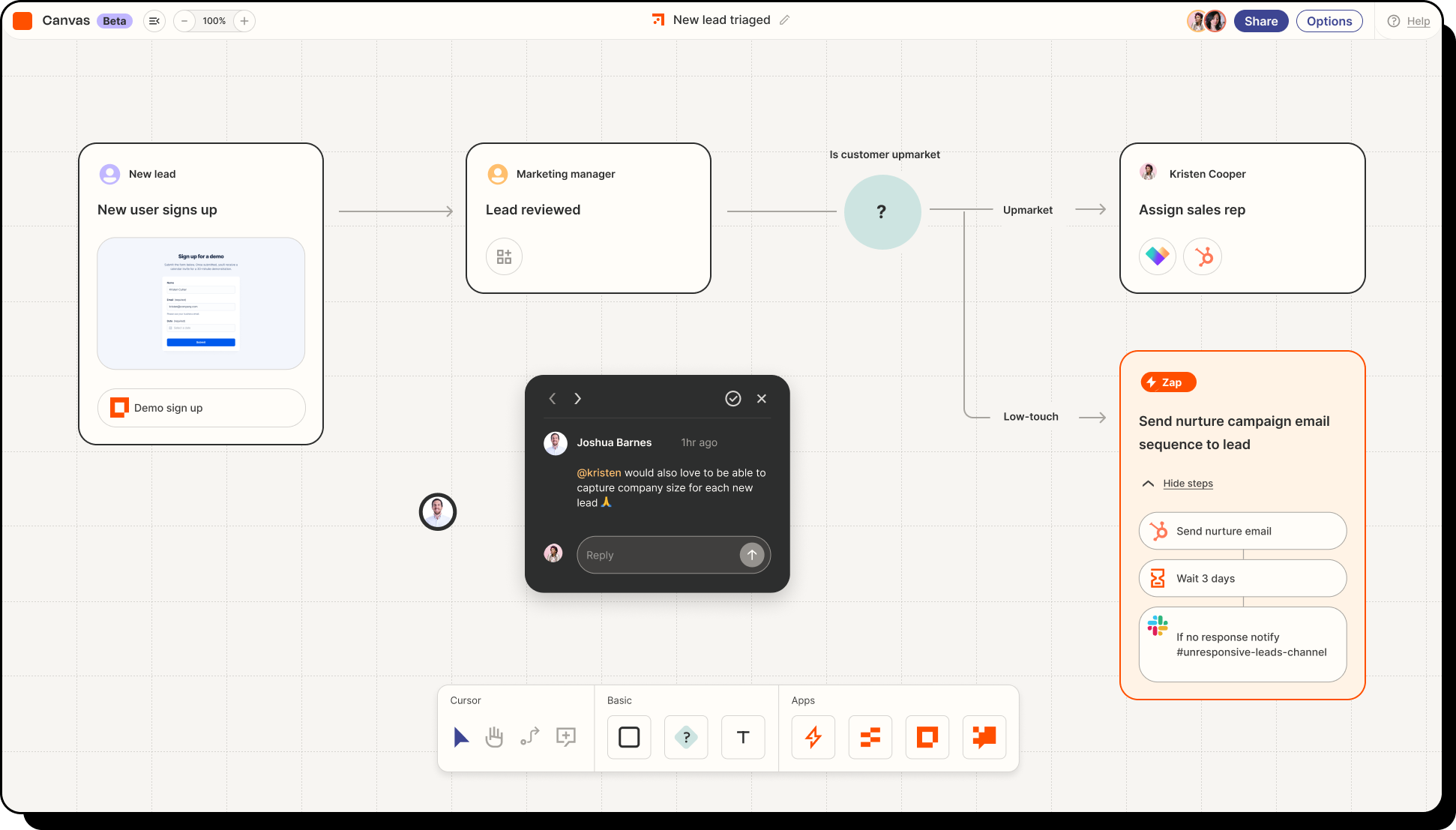
AI workflow automation tools operate at the process level. They connect multiple steps across systems and apply AI within those workflows to handle variation.
Common examples include:
- Zapier - Classic workflow automation that now incorporates lightweight AI steps for classification, routing, and data transformation across apps.
- Workato - Enterprise-grade workflow orchestration with governance controls and broad SaaS connectivity.
- n8n - Developer-friendly orchestration that mixes integrations with configurable logic and AI augmentation.
- PixieBrix - A workflow platform that runs directly in the browser, allowing teams to embed automation logic and intelligence inside the tools they already use. Instead of moving work between apps, PixieBrix brings workflow steps, context enrichment, and logic execution right where agents and operators are already working.
These tools are a major step forward from rules-based automation because they can tolerate messier inputs and more complex flows.
Where they shine
- Cross-tool coordination
- Repeatable operational workflows
- Scaling processes across teams
Where they fall short
- Workflows grow complex and brittle over time
- Context often lives outside the workflow
- Logic must still be anticipated in advance
Workflow automation improves coordination, but it can struggle when decisions depend on nuance, judgment, or real-time context scattered across tools.
AI Tools for Business Automation

AI tools for business automation operate at the system level. They’re designed to support mission-critical functions where reliability, trust, and scale matter.
Examples in this category include:
- UiPath using AI to augment enterprise processes
- AI-powered agent assist tools embedded in support platforms
- Browser-native orchestration tools like PixieBrix, which bring context-aware automation directly into existing applications
At this level, automation is no longer about speeding up steps. It’s about supporting decisions and outcomes across teams.
These tools often combine:
- Context awareness across multiple systems
- AI-assisted decision support
- Workflow orchestration
- Human-in-the-loop controls and governance
Where they shine
- Customer support and operations
- Revenue and internal ops workflows
- High-volume, high-impact processes
- Clear ROI measurement
Where they fall short
- Longer setup and rollout
- Requires process ownership and discipline
- Less forgiving of unclear workflows
Business automation tools aren’t about experimentation. They’re about production-grade AI.
Where Most AI Automation Efforts Fail (and Why It’s Predictable)
Most AI automation projects don’t fail because the technology is bad. They fail because teams apply the right tools to the wrong problems or the wrong tools to the right problems. Once you’ve seen a few of these efforts up close, the patterns become obvious.
Failure Mode 1: Treating AI Automation as a Tool, Not a System
Teams often start by adding AI to a single step:
- An AI summarizer here
- A classifier there
- A workflow trigger somewhere else
Each addition looks reasonable on its own. The problem is that nothing owns the system end to end.
Without orchestration:
- Context gets lost between steps
- Errors compound silently
- Humans are forced to “patch” the gaps
Automation succeeds when it’s treated as infrastructure, not a collection of clever features.
Failure Mode 2: Automating Broken or Undefined Processes
AI doesn’t fix unclear processes. It amplifies them. When teams automate workflows they don’t fully understand:
- Edge cases explode
- Exceptions become the norm
- Agents lose trust in the system
In practice, this looks like:
- Automations that only work “most of the time”
- Constant overrides and manual corrections
- Quiet abandonment by the people meant to use them
AI automation works best when processes are directionally clear, even if they aren’t perfect.
Failure Mode 3: Expecting AI to Make Decisions Without Context
Many automations fail because they operate on partial information, they rely on:
- A single data source
- A narrow event trigger
- One representation of the problem
But real work depends on context spread across tools, conversations, and systems.
When automation can’t see the full picture:
- Decisions feel arbitrary
- Agents second-guess recommendations
- Escalations increase instead of decrease
Context awareness isn’t a nice-to-have. It’s the difference between helpful automation and noise.
Failure Mode 4: Over-Automating Too Early
In the rush to “use AI,” teams often try to automate everything at once. This creates:
- Large, fragile workflows
- Complex logic that’s hard to debug
- Resistance from users who don’t yet trust the system
The most successful teams start narrow:
- One queue
- One workflow
- One outcome
They prove value, build confidence, and expand deliberately.
Failure Mode 5: Ignoring the Human in the Loop
Automation that sidelines humans tends to fail quietly. When people don’t understand:
- Why an action was taken
- Where recommendations came from
- How to intervene when something looks wrong
...they stop trusting the system.
High-performing AI automation designs for collaboration, not replacement. Humans remain accountable. AI reduces friction around their judgment.
The Pattern Behind These Failures
Across industries and teams, the same truth emerges: AI automation fails when it’s treated as a shortcut and it succeeds when it’s treated as a capability that compounds over time.
Teams that succeed:
- Anchor automation in real workflows
- Preserve context across systems
- Roll out incrementally
- Keep humans involved where judgment matters
Once those foundations are in place, AI automation stops feeling fragile and starts feeling inevitable.